

Provisioning, Domains & Roles
OIDC and SAML providers use the same account and authorization flow after UIGraph validates the identity-provider response. This page explains how users find an organization, how accounts and memberships are created, and how SSO attributes determine organization roles.
Organization discovery
The UIGraph sign-in screen asks for an email before showing authentication methods. The API returns organizations found through either:
- A configured organization discovery domain matching the email domain.
- An existing UIGraph account and organization membership for that email.
When one organization is found, UIGraph proceeds directly to its authentication methods. When several are found, the user chooses a workspace.
Discovery requests are limited to 20 attempts per email address in a 15-minute window.
Discovery domains
An organization discovery domain controls whether an organization is offered for an email domain. For example, adding example.com allows a user entering person@example.com to discover the organization before an account exists.
Current behavior and limitations:
- An organization can currently have one discovery domain. Adding a second is rejected — change the existing one instead.
- UIGraph checks that the domain is well formed, but does not verify that you own it.
- You need permission to administer the organization's authentication providers.
Managing the domain
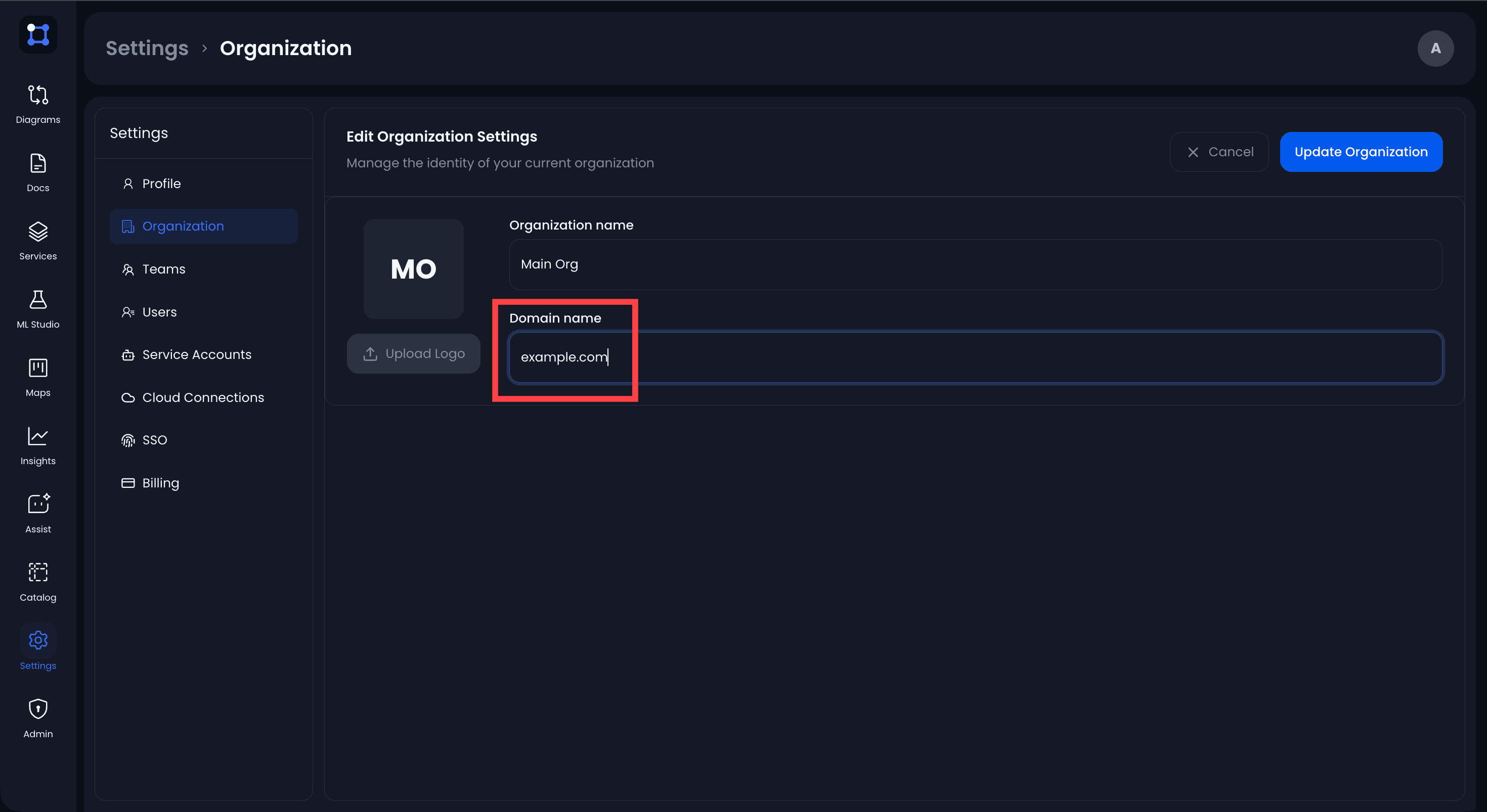
Organization administrators manage the discovery domain under Settings → Organization. The page shows a single Domain field:
| Action | What to do |
|---|---|
| Add a domain | Enter a domain in the empty field and save. |
| Change the domain | Replace the existing value and save. |
| Remove the domain | Clear the field and save. |
Capitalization does not matter — Example.COM and example.com are the same domain.
Domain ownership
Only register domains your organization controls. Because ownership is not verified, discovery domains should not be treated as proof of identity or authorization. Provider validation and allowed-domain rules are still applied during login.
Provider allowed domains
Each provider has a separate comma-delimited Allowed domains setting. It checks the normalized email returned by the IdP before the account or membership is updated.
| Configuration | Result |
|---|---|
| Empty | Any valid email domain returned by the provider is accepted. |
example.com | Only @example.com addresses are accepted. |
example.com, subsidiary.example | Either exact domain is accepted. |
Matching is case-insensitive and exact. Configuring example.com does not also permit subdomain.example.com.
Use allowed domains for public providers such as Google or GitHub whenever new-user sign-up is enabled.
Account matching
After a successful provider response, UIGraph:
- Requires a valid email address.
- Normalizes the email to lowercase.
- Applies the provider's allowed-domain restriction.
- Looks up the UIGraph user by email.
- Rejects disabled users.
An existing password user with the same normalized email is reused. UIGraph does not create a duplicate account for that SSO login.
OIDC subjects and SAML NameIDs are stored as provider identity links when present, but the current login flow first resolves the UIGraph account by email. Changing a user's provider email can therefore affect account matching.
First-login provisioning
The provider's Allow new users to sign up setting controls just-in-time account creation:
| User state | Sign-up enabled | Sign-up disabled |
|---|---|---|
| Existing UIGraph user | Login continues | Login continues |
| No UIGraph user | Account is created | Login is rejected |
For a new account:
- The provider email becomes the UIGraph email and login.
- The configured name claim or attribute becomes the display name.
- The email is used as the display name when no name is returned.
- Membership is created only in the organization that owns the selected provider.
UIGraph does not currently send invitations or require email verification after the IdP has returned the email.
Organization membership
Every successful SSO login creates or updates membership in the provider's organization:
- The membership source is recorded as
sso. - The role is recalculated from current mapping rules.
- The resulting role replaces the previous role for that organization membership.
This means a manual organization-role change can be overwritten the next time the user signs in through that provider.
SSO does not automatically add the user to other organizations, even if those organizations share an email domain or have another provider configured.
Default role
Every provider requires one default organization role:
| Role | Intended access |
|---|---|
viewer | Read-only organization access. |
editor | Create and update organization content. |
admin | Organization administration, including SSO provider management. |
The exact product permissions are controlled by UIGraph's authorization policy. Use viewer as the safest default and grant elevated roles through narrowly defined mapping rules.
Role mapping rules
Role mappings inspect OIDC claims or SAML attributes. Rules are evaluated from top to bottom by priority. The first matching rule determines the role; when no rule matches, the provider's default role applies.
A rule contains:
| Part | Description |
|---|---|
| Attribute key | OIDC claim or SAML attribute to inspect, such as groups. |
| Operator | Comparison performed against the attribute. |
| Attribute value | Expected value, except for operators that do not take a value. |
| Role | admin, editor, or viewer. |
Rules support scalar strings and string arrays. A dot-separated key can traverse nested claim objects, such as realm_access.roles.
Operators
| Operator | Behavior |
|---|---|
equals | At least one value exactly equals the configured value. |
notEquals | The attribute exists and none of its values equals the configured value. |
contains | At least one value contains the configured text. |
notContains | The attribute exists and none of its values contains the configured text. |
startsWith | At least one value starts with the configured text. |
endsWith | At least one value ends with the configured text. |
exists | The attribute is present; no comparison value is required. |
notExists | The attribute is absent; no comparison value is required. |
regex | At least one value matches the configured regular expression. |
Comparisons are case-sensitive. Test values exactly as the IdP returns them.
Example rule order
For an OIDC provider returning a groups claim:
| Priority | Attribute | Operator | Value | Role |
|---|---|---|---|---|
| 1 | groups | contains | uigraph-admins | admin |
| 2 | groups | contains | uigraph-editors | editor |
With a default role of viewer:
- A member of
uigraph-adminsanduigraph-editorsbecomes an admin because the first rule wins. - A member only of
uigraph-editorsbecomes an editor. - Everyone else becomes a viewer.
Changes to mappings apply on the user's next successful SSO login. Saving a role mapping does not require separately saving the provider form.
OIDC mapping data
OIDC mappings can inspect merged ID-token and UserInfo claims. Configure these provider fields so account identity uses the intended values:
| Field | Default |
|---|---|
| Email Claim | email |
| Name Claim | name |
| Subject Claim | sub |
| Groups Claim | groups |
The Groups Claim setting supplies the default attribute name when creating a mapping rule; mappings can inspect other attribute keys as well.
Review the current ID-token validation limitation before using an ID-token-only claim to grant elevated roles: OIDC token validation.
SAML mapping data
SAML mappings can inspect all attributes from the validated assertion. UIGraph indexes attributes by canonical and friendly name when both are available.
The configured Groups Attribute supplies the default key when creating a mapping rule. It does not limit mappings to group data.
Deprovisioning behavior
UIGraph does not currently support SCIM or continuous directory synchronization.
Consequences:
- Removing a user from the IdP does not delete or disable the UIGraph account.
- Removing an IdP group does not change the UIGraph role until the next successful SSO login.
- Terminating the IdP session or disabling the UIGraph user does not delete existing UIGraph sessions.
- If the IdP still allows authentication, a new login recalculates the membership role.
Disable the UIGraph user to prevent future password and SSO login. The current product does not provide an administrator endpoint to revoke all sessions for a user, so an already issued session can remain valid until logout or expiry. Account for this limitation in urgent offboarding procedures.
Provider lifecycle
- Disable a provider to remove it from the organization's sign-in choices without deleting its configuration.
- Delete a provider to remove it and its dependent mapping rules and identity links.
- Existing UIGraph sessions are independent of provider enablement and continue until logout or expiry.
- Keep a tested password administrator account before disabling or deleting the only working SSO provider.